
Thinking about upgrading or replacing your Mac’s hard drive? Here’s something to think about:
Fifteen years ago Seagate was the hard drive you could count on for reliability and longevity, back when they were still manufactured in the US, in Scotts Valley, CA. Not so anymore, not for a long time actually. They have dropped from being number one to the bottom of the barrel. As for Western Digital, I had a too many drives fail back in the early 2000s so I stopped buying them. Last year I bought a couple 2TB Toshiba 3.5″ drives and was really pleased that they ran so coolly and so quietly, but after less than a year one failed, completely. It would spin but it could not be accessed nor formatted. A big disappointment.
I have a 2TB Hitachi drive that I bought five years ago and it is still going strong, but it runs very hot in a Wiebe FW 800 external hard drive case. Nevertheless, Hitachi has the best reliability record of the four brands I have experience with, and the highest rating amongst users. The graph below is from backblaze.com, definitely an authority on hard drives based on their use of over 30,000 drives in their enterprise networks. As a matter of protocol they track the usage and failure rate of all their drives. Check this out, it’s well worth reading: Hard Drive Reliability Update 2014.
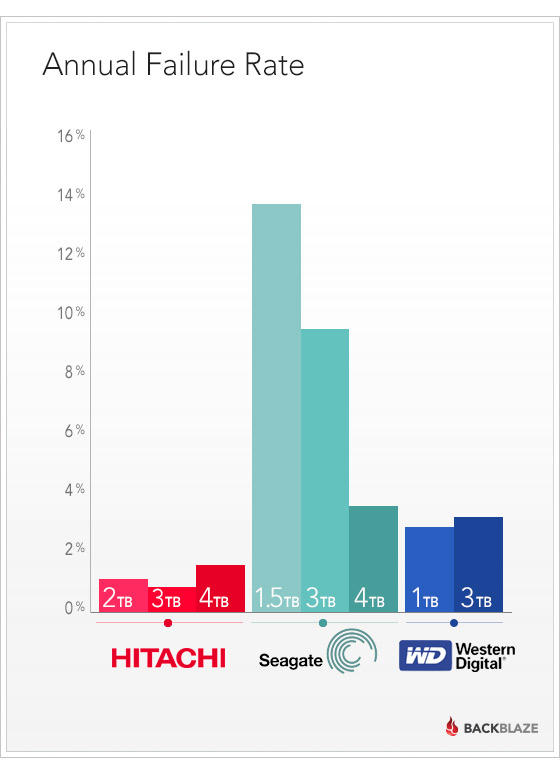
As you can see, Hitachi has a failure rate that is less than half that of Western Digital, and as far as Seagate goes, they’re not even in the running.
Three weeks ago I decided it was time to upgrade my MacBook Pro (Early 2011 15″ i7 2.3 GHz) and so I began looking for a 1TB drive that would offer me the speed and reliability as well as the increased hard drive space that I needed for working with Photoshop. I also did not want to spend a fortune on it, and although the incredible specs and lifespan of SSDs (solid state drives) was really appealing, the $400+ cost was simply prohibitive.
I was about to buy an HGST (Hitachi) 7200 RPM drive with 16MB cache that received 4.5 stars on Amazon when I noticed a Seagate Hybrid drive that also got decent reviews on Amazon (4.4 stars). It was listed as having a 7200 RPM spin speed and a 64MB cache. Wow! The Seagate advertising hype states “Our SSHD is up to 4X faster than standard 7200-RPM hard drives; they improve system-level performance by an average of 20% and you’ll get far faster boot ups.” The cost for the hybrid drive is about $104 compared to the HGST standard drive at $71, although there’s the exact same Seagate drive with a different model number that sells for $84 on Amazon. I decided I’d simply have to buy the Seagate, and did so from Amazon Prime.
Upon receiving it I promptly installed it in my MacBook Pro and fired it up. I was amazed right from the get-go. Compared to the stock 750GB 5400 RPM drive, the Seagate was lightning fast! I then proceeded to open various apps, including Adobe Bridge and Photoshop, both of which opened very rapidly, as did MS Word. The next day I needed to transfer a large amount of files (60GB worth) from an external 7200 RPM drive. I expected it to be quite quick, but I was sorely disappointed. It took nearly an hour to make the transfer. I then transferred those same same files to another, older MacBook Pro that also has a 7200 RPM drive. It took less than twenty minutes. At this point I decided to read a bit more about the Seagate, and going to Seagate’s site I discovered two things that were in error on the Amazon page: the drive I bought is a 5400 RPM drive, not 7200, and the cache is 8MB not 64MB! That’s a big, big difference.
The Seagate was running quietly and coolly, but in spite of that I felt that I had been duped by Amazon or whoever was responsible for the Amazon specs in their ad: I thought I purchased a 7200 drive with a 64MB cache and that’s not what I received. Reading more reviews I discovered other people had also bought the drive based on it being a 7200 RPM drive. Now, an odd thing happened at this point, the Amazon ad no longer stated that it was a 7200 RPM drive, but a 5400 drive, as it actually is. The ad still states 64MB cache, though.
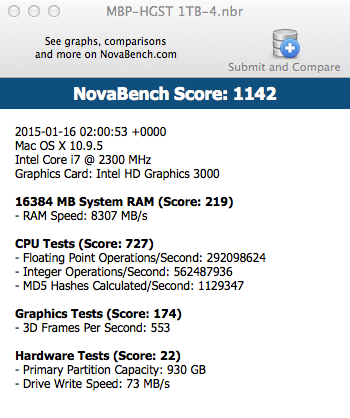
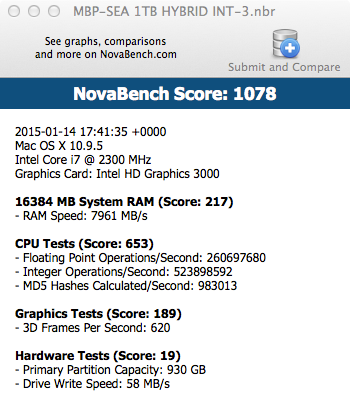
I decided to go ahead and buy the HGST drive and do my own comparison. Guess what? In almost all real-life tests the HGST 7200 RPM HD out-performed the Seagate SSD. It booted faster, transferred files much, much faster and opening and refreshing Photoshop files when changed was as fast if not a little faster. The HGST does run a little hotter, but I don’t think it’s hot enough to make a real difference as far as affecting long-term performance or wear on the fans, which don’t run any more often than the SSD drive does. Here are the NovaBench results for both drives installed in my MacBook Pro; the important score to look at is the Hardware Tests, Drive Write Speed. These are the best scores out of four tests each; the lowest score for the Seagate Drive Write Speed was 22 MB/s, the highest 58 MB/s. In each test the HGST scored higher:
The bottom line really came down to one thing: Reliability. Based on the failure rate graph above, I decided I did not want to take a chance in the long run of having to go through the trouble of replacing the Seagate SSD when it failed, not to mention it would probably happen right after it went out of warranty, as drives often do for some reason. I returned the Seagate and bought a second HGST and installed it in a Wiebe 2.5″ external Firewire 800 enclosure for backup using Carbon Copy Cloner, so that if the HGST does fail I will have a nearly identical drive I can plug right in without too much loss of data. I also back up the MacBook Pro to an Airport TimeCapsule using Time Machine to further minimize data loss as it keeps backups on an hourly basis.
One thing you can count on, all hard drives do fail, sooner or later. Solid State drives are a different story, so far. If you can afford it, a new solid state drive, now available in higher capacities, has a life expectancy that will certainly exceed the useful life span of any computer.
Mac-Techs.Net can help you with all of your hard drive upgrades, replacements or repair.

Use Backblaze for Backing Up Your Mac